

MCVoting
New to Minecraft server voting? This guide explains how voting works, why servers use it, what rewards you can earn, and how to cast your vote safely on MCVoting.com. Perfect for players who want to support their favourite servers and discover new ones.

MCVoting
You have spent hours grinding, building, fighting, trading, or exploring on a Minecraft server. Maybe you joined for survival, Skyblock, Lifesteal, SMP, Prison, Factions, or another game mode. If the server is fun, active, and worth coming back to, voting is one of the easiest ways to support it.
That is where mcvoting comes in.
Voting helps good Minecraft servers get seen by more players. It gives server owners a way to grow their community, and it gives players a simple way to earn rewards while supporting the servers they enjoy.
In this guide, you will learn what Minecraft server voting is, how it works on MCVoting.com, what rewards you might receive, and what to do if your vote does not appear straight away. You will also learn how server owners use voting systems to encourage growth without making the process confusing for players.
By the end, you will know exactly how to browse, vote, and get more value from your favourite Minecraft servers.
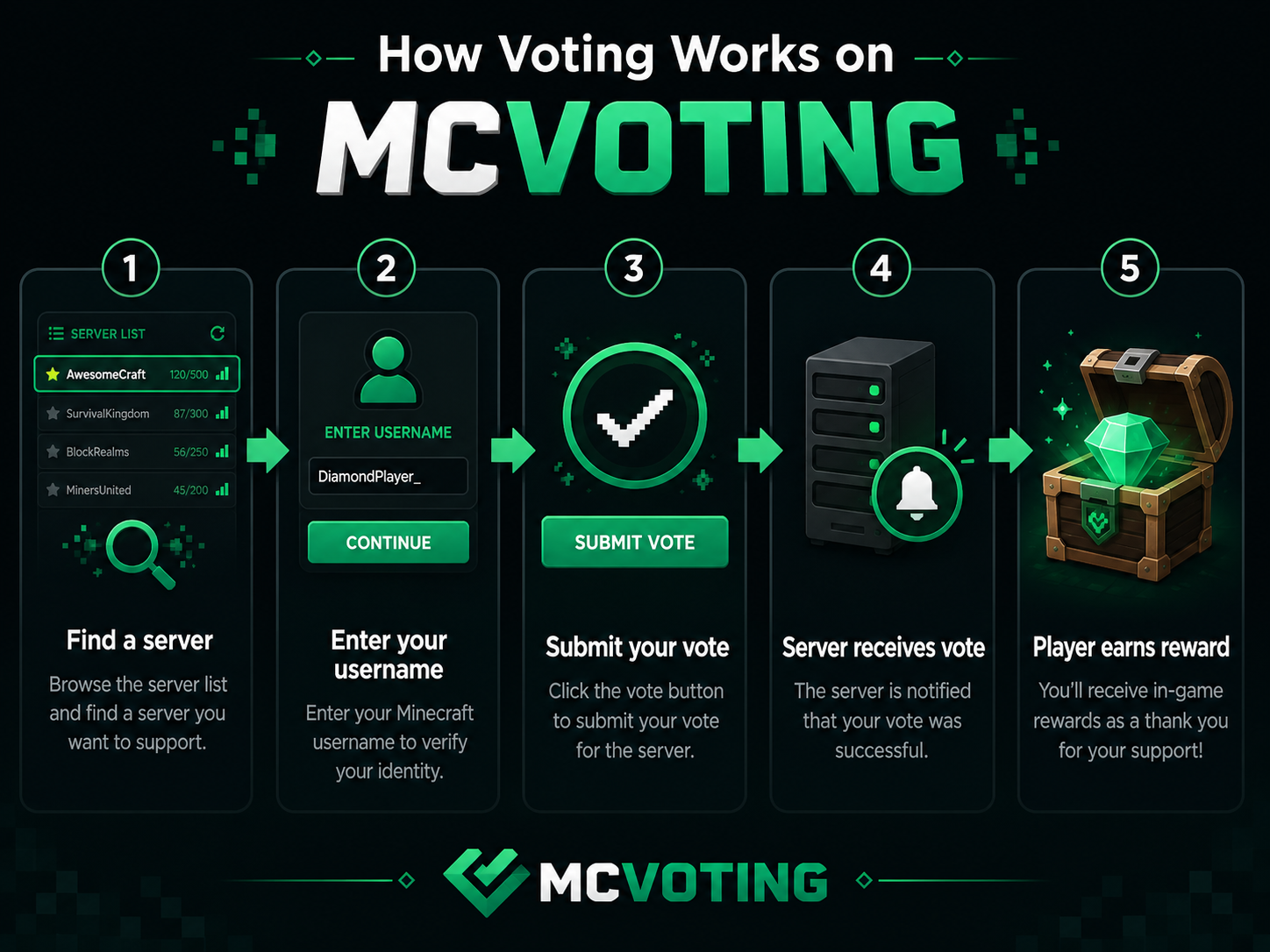
Step 1 — Find a Minecraft Server You Want to Support
Before you vote, you need to choose a server. Some players vote for a server they already play every day. Others use voting sites to discover something new.
On MCVoting.com, you can browse servers by category, game mode, version, and community style.
To get started:
Visit MCVoting.com.
Browse featured servers or go to the full server list.
Choose a server that matches the way you like to play.
Open the server page to read its description, features, and voting details.
Check whether the server supports the Minecraft version you play.
You can also use the Browse all Minecraft servers page if you want to compare more options.
Tip: Look for servers that clearly explain their rules, rewards, game modes, and community style. A good server page should help you decide whether it is worth joining before you vote.
Step 2 — Enter Your Minecraft Username and Vote
Once you have found a server, the next step is simple: enter your Minecraft username and submit your vote.
The voting page is usually built to be fast. You should not need to create a long account or fill in unnecessary details just to support a server.
A typical vote works like this:
Open the server’s vote page.
Enter your Minecraft username exactly as it appears in-game.
Complete any verification step if one is shown.
Submit your vote.
Rejoin or check the server to see if your reward arrives.
Make sure your username is spelled correctly. If you enter the wrong name, the vote may still count for the server, but the reward may go to the wrong account or fail to deliver.
Note: Some servers may require you to be online when voting rewards are sent. Others can store rewards and deliver them when you next join. This depends on how the server owner has configured their voting system.
Step 3 — Claim Your Voting Rewards
Many Minecraft servers give rewards when you vote. These rewards are set by the server owner, not by the voting directory itself.
Common voting rewards can include:
In-game money
Crate keys
Claim blocks
XP
Rank points
Tokens
Cosmetics
Temporary boosts
Vote party progress
For example, a server might reward you with one vote key each time you vote. Another server might add your vote to a community vote party, where all online players receive a reward after a certain number of votes.
This is one reason players use mcvoting regularly. You can support your favourite server and receive useful items at the same time.
If you do not receive your reward instantly, wait a few minutes and check the server’s instructions. Some servers process votes faster than others.
Step 4 — Come Back When You Can Vote Again
Most Minecraft voting systems limit how often you can vote. A common setup is one vote per server every 24 hours, but the exact timing can vary depending on the site and server configuration.
To make the most of voting:
Vote for servers you genuinely enjoy.
Check when you are allowed to vote again.
Join the server after voting if rewards require you to be online.
Keep an eye out for streak rewards, vote parties, or monthly voter leaderboards.
Avoid trying to bypass vote limits, as this can break server rules.
Voting consistently can help you earn more rewards over time. It also helps your favourite communities climb server listings and attract new players.
Why Minecraft Server Voting Matters
Minecraft servers need visibility. Even a well-built server can struggle if players cannot find it. Voting gives real players a way to show which servers are active, trusted, and worth checking out.
For players, voting is useful because it can turn a simple action into in-game progress. For server owners, it is a growth tool that can bring new traffic without relying only on paid ads or social media.
The main benefits are:
Players discover new servers without guessing which ones are active.
Server owners grow their communities through real player support.
Voting rewards encourage daily engagement and repeat visits.
Popular servers become easier to find in directory listings.
Communities feel more involved because players can directly support the server.
That is the main idea behind mcvoting: players help servers grow, and servers reward players for taking part.
Common Questions / Troubleshooting
My vote went through, but I did not get a reward. What should I do?
First, check that you entered your Minecraft username correctly. Then wait a few minutes and join the server if you are not already online. Some servers only deliver rewards when you are connected.
If you still do not receive anything, contact the server’s staff team. The reward system is controlled by the server owner, so they are the best people to check vote logs and reward settings.
I typed the wrong username. Can I fix it?
Usually, you cannot edit a vote after it has been submitted. If the username was wrong, the server may not be able to send the reward to your account.
Next time, copy your username directly from your Minecraft launcher or profile to avoid spelling mistakes.
The server says I already voted. Why?
You may need to wait before voting again. Many voting systems use a cooldown, often around 24 hours. If you voted recently, the site may block another vote until the cooldown ends.
Is voting the same as joining a server?
No. Voting supports the server on the directory, but joining is separate. To play, you still need to copy the server IP, open Minecraft, add the server, and connect from your multiplayer menu.
FAQ
What happens when you vote for a Minecraft server?
When you vote for a Minecraft server, your vote helps that server gain visibility on the voting directory. If the server has rewards configured, your Minecraft username may also receive an in-game reward such as money, keys, XP, or tokens.
How often can you vote for a Minecraft server?
Many Minecraft voting systems allow one vote per server every 24 hours. However, the exact cooldown can vary depending on the voting site and how the server has set up its vote system.
Do you get rewards for voting?
Often, yes. Many servers reward players for voting, but the reward depends on the individual server. Some give crate keys, currency, XP, claim blocks, or vote party progress. Always check the server’s vote page for details.
Is it safe to vote for Minecraft servers?
Voting is generally safe when you use a trusted Minecraft server directory and only enter the information required to vote, such as your Minecraft username. You should not share your Minecraft password on a voting page.
What is the best Minecraft voting site?
The best Minecraft voting site is one that makes it easy to discover servers, compare communities, and cast votes without confusion. MCVoting.com is built as a community-powered Minecraft server directory where players can browse, vote, and support their favourite servers.
Conclusion
Voting is one of the simplest ways to support a Minecraft server you enjoy. It helps server owners reach new players, keeps communities active, and can reward you with useful in-game items along the way.
With MCVoting.com, you can browse Minecraft servers, compare different game modes, and vote for the communities you want to support.
Explore hundreds of Minecraft servers, read real player reviews, and cast your vote at MCVoting.com — the community-powered Minecraft server directory.
Ready to grow your server? List your Minecraft server on MCVoting for free and start receiving votes today.