

How to Vote on Minecraft Servers (and Why It Matters)
Voting is one of the easiest ways to support a Minecraft server and earn useful in-game rewards. This guide explains how to find a server’s vote page, enter your username safely, claim rewards, fix common problems, and understand why every vote helps a community grow.

How to Vote on Minecraft Servers (and Why It Matters)
You have spent hours building a base, trading with other players or competing in events on your favourite Minecraft server. But how do you show the server owner that you enjoy playing there?
One of the easiest ways is to vote.
Minecraft server voting allows you to support a server through an external server directory. In return, many servers give you in-game rewards such as currency, crate keys, experience, items or temporary boosts.
Voting only takes a minute, but it can make a noticeable difference to a growing community. Every verified vote can help a server appear more prominently in server listings, making it easier for new players to discover.
Players searching for Prisons Minecraft Servers or other popular gamemodes may encounter hundreds of alternatives through server directories. Understanding how voting works helps you support the communities you actually enjoy while earning rewards for your time.
This guide explains how to find a voting page, submit your vote safely, claim your reward and fix the most common voting problems.
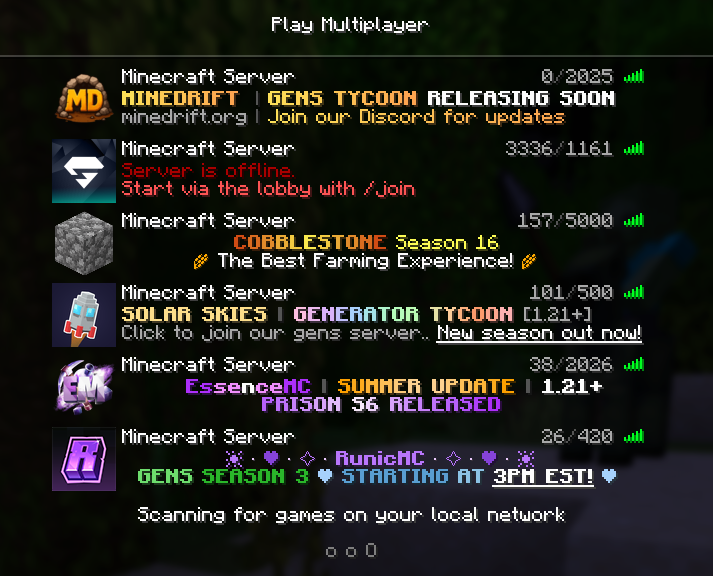
Step 1 — Find the Server’s Official Voting Page
Before you can vote, you need to find the correct listing for the server.
The safest option is to use a recognised Minecraft server directory such as MCVoting.com. You can search for a specific server or browse different categories until you find one that interests you.
Visit the MCVoting server list.
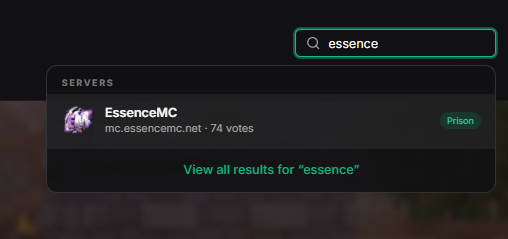
Search for the server by its name or address.
Open the server’s listing page.
Check that the description, server address and supported edition match the server you want.
Select the voting option on the listing.
Some servers also provide voting links through an in-game command such as /vote. This may display one or more websites where you can support the server.
Check That You Have the Correct Server
Servers can have similar names, so check the listing before entering your username. Look for details such as:
The correct Java or Bedrock server address
Supported Minecraft versions
Gamemodes and features
The server’s official website or Discord
Branding that matches what you see in-game
A search for prisons, for example, may also return independent servers offering minigames or network-style gameplay. Always confirm that you are viewing the exact server you intended to support.
Step 2 — Enter Your Minecraft Username
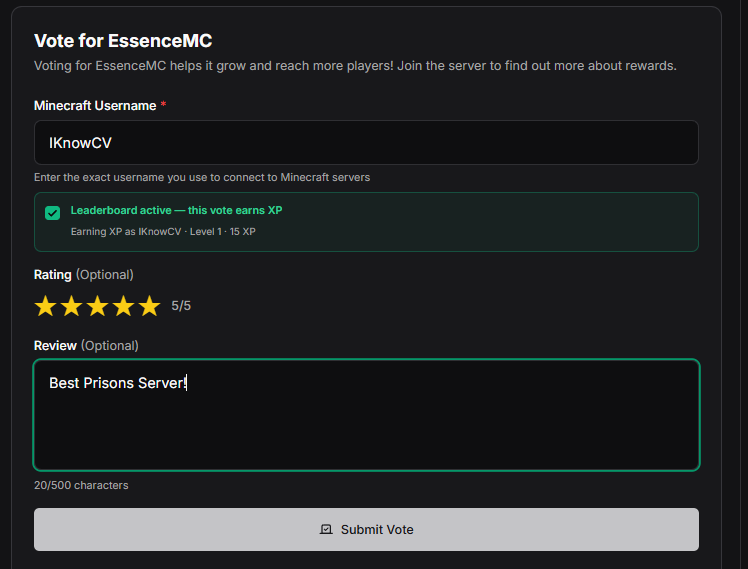
Once you open the voting form, you will normally be asked for your Minecraft username.
Enter the username you use on the server. The exact information required may depend on whether the server supports Java Edition, Bedrock Edition or both.
Type your Minecraft username or gamertag carefully.
Check the spelling and capitalisation.
Complete any human-verification check shown on the page.
Press the button to submit your vote.
Wait for the confirmation message before closing the page.
You should not need to enter your Minecraft password, Microsoft password or account recovery information to vote.
A legitimate voting form normally only needs enough information to identify your player account and send the vote to the correct server.
Step 3 — Submit and Verify Your Vote
After you submit the form, the voting website verifies the request. This may include checking that you are not a bot and confirming that you have not already voted within the site’s cooldown period.
Once accepted, the voting website sends a notification to the Minecraft server. Many servers use a vote-listener system to connect external votes with in-game player accounts.
The basic process looks like this:
You submit a vote → the voting site verifies it → the server receives it → your account is credited → you receive a reward
The entire process may happen within a few seconds. However, a reward can occasionally take longer if the server is restarting, temporarily offline or processing a queue of votes.
Step 4 — Claim Your Minecraft Voting Rewards
Many servers reward players automatically when a vote is received.
Depending on the server, your reward may appear instantly in your inventory or account balance. Other servers may require you to run a command, visit a rewards menu or speak to an in-game character.
Common Minecraft voting rewards include:
In-game currency
Crate or loot-box keys
Experience points
Cosmetic items
Temporary rank benefits
Extra claim blocks
Tokens or shop credits
Random reward bundles
Entries into monthly voting competitions
The reward system is controlled by each individual server. MCVoting provides the voting platform, while the server owner decides what players receive.
If the server supports offline voting, your reward may be stored until you next join. If it does not, you may need to be online when submitting your vote.
Look for Vote Streaks
Some servers provide better rewards when you vote regularly. A voting streak might count consecutive days, total monthly votes or votes across several different websites.
For example, a server might give you:
A standard reward for every vote
A bonus after seven consecutive days
A larger reward after 30 votes
A leaderboard prize at the end of the month
Check the server’s /vote, /rewards or /voteshop menu to see whether streaks or milestones are available.

Step 5 — Vote Again When the Cooldown Ends
Most server directories limit how often one player can vote for the same server. A common limit is one vote per listing within a 24-hour period, although the exact cooldown can vary.
If your vote is rejected because you have already voted, wait until the displayed cooldown expires and try again.
Servers may be listed on several voting websites. This means you might be able to vote once on each supported site and receive separate rewards for every successful vote.
To keep track of your votes, you can:
Use the voting links provided by the server.
Vote at roughly the same time each day.
Save the server’s MCVoting listing.
Check whether the server displays your cooldowns in-game.
Enable reminders only when the voting site or server offers them transparently.
Avoid using automated voting scripts. These can break voting-site rules, produce invalid votes and potentially cause problems for both your account and the server.
Why Minecraft Server Voting Matters
Voting is not just a way to collect free items. It also helps multiplayer communities remain visible.
Minecraft directories often use votes as one signal when organising or promoting listed servers. A server receiving regular support may become easier for new players to find when browsing a category or searching for a particular type of gameplay.
That matters because independent servers compete for attention with large networks and commonly searched phrases such as hypixel minecraft servers. A small survival, prison or minigame community may not have a huge advertising budget, but its existing players can still help it grow through genuine votes and reviews.
Benefits for Players
Voting can help you:
Earn useful in-game rewards
Progress through the server more quickly
Unlock vote streaks and milestones
Support a community you enjoy
Help more players discover the server
Encourage owners to continue improving the experience
Benefits for Server Owners
Votes can help server owners:
Increase visibility within server directories
Attract players already interested in their gamemode
Measure community engagement
Reward loyal players
Build recurring player habits
Compete without relying entirely on paid advertising
For server owners, voting works best when the rewards are useful without becoming unfair. Players should feel appreciated, but voting rewards should not damage the server’s economy or create an excessive pay-to-win-style advantage.
How to Choose a Server Worth Voting For
You do not need to vote for every server you join. Support servers that provide a good experience and treat their players fairly.
Before voting, consider:
Does the server description match the actual gameplay?
Are the rules clear and consistently enforced?
Is the community welcoming?
Does the server appear actively maintained?
Are voting rewards explained clearly?
Does the server avoid misleading claims?
Can you find its official website or community links?
Large networks may dominate searches for terms such as hypixel minecraft servers, but directories can also help you find smaller communities with distinctive gamemodes, custom features and more personal player support.
You can browse all Minecraft servers to compare listings before choosing where to play.
Common Questions and Troubleshooting
My Vote Was Accepted, but I Did Not Receive a Reward
First, wait a minute and check your inventory, balance and chat messages. The reward may have been added without opening a separate menu.
You can also try:
Rejoining the server
Running
/vote,/rewardsor/claimChecking that you entered the correct username
Confirming whether you needed to be online
Asking server staff whether offline rewards are supported
MCVoting confirms and sends the vote, but the individual Minecraft server controls the reward system.
The Website Says I Have Already Voted
You are probably still within the voting cooldown. Wait until the timer expires before voting again.
The cooldown may be based on your username, network address or a combination of verification methods. Repeated attempts will not normally reset it.
I Entered the Wrong Username
A reward may be assigned to the username you submitted. Contact the server’s staff and explain what happened, although they may not be able to transfer an incorrectly submitted reward.
Check your username carefully before confirming future votes.
The Server Is Offline
The voting page may still accept your vote while the game server is offline. Whether you receive the reward later depends on the server’s vote-listener setup.
Try joining again when the server returns online. If the reward does not appear, contact the server owner or support team.
The Voting Page Will Not Load
Check your internet connection and refresh the page. Browser privacy tools, script blockers or network filters can occasionally prevent verification challenges from loading.
Try another modern browser or temporarily allow the voting page’s essential scripts. Do not disable security software permanently.
FAQ
What happens when you vote for a Minecraft server?
The voting website verifies your submission and sends the vote to the selected server. The vote may improve the server’s position or visibility within the directory. If the server has configured rewards, your Minecraft account may also receive currency, items, keys or other bonuses.
How often can you vote for a Minecraft server?
Many voting websites allow one vote per server within a 24-hour period. However, each website can use a different cooldown. Check the voting page for the exact time remaining before your next vote.
Do you get rewards for voting?
Many servers offer rewards, but they are not guaranteed. The server owner chooses whether to provide rewards and decides what those rewards contain. Check the server’s listing, voting menu or in-game instructions before voting.
Is it safe to vote for Minecraft servers?
Voting is generally safe when you use a trusted directory and only provide your public Minecraft username or gamertag. A voting page should never require your Microsoft password, authentication code or account recovery details.
What is the best Minecraft voting site?
The best site is one that provides clear server information, secure voting, useful discovery tools and transparent listings. MCVoting.com helps players discover communities, compare servers and support their favourites through verified votes. Players searching for hypixel minecraft servers can also use directories to explore independent alternatives with different gamemodes and communities.
Conclusion
Voting is a quick way to support the Minecraft communities you enjoy. Find the correct server listing, enter your username, complete the verification process and check in-game for your reward.
Your vote may earn you currency, keys or other benefits, but it also helps the server reach new players. For smaller communities, regular support from existing members can be especially valuable.
Explore Minecraft servers, read player information and cast your vote at MCVoting.com — the community-powered Minecraft server directory.
Ready to grow your own community? List your Minecraft server on MCVoting for free and start receiving votes today.