
Free MC Hosting
Looking for a free Minecraft server host? This guide explains what free hosting can realistically handle, compares popular options such as Aternos, Minehut, Falix and ScalaCube, and shows what to check before launching a survival, plugin-based or modded server.
Free MC Hosting
Running your own Minecraft server does not have to mean paying for hosting from day one. If you only want to build a survival world with friends, test some plugins, experiment with a new gamemode or learn how Minecraft servers work, free mc hosting can be a practical place to start.
The catch is that "free" rarely means unlimited resources. Free hosts usually have restrictions around RAM, CPU performance, player slots, file access, server startup or how long an empty server stays online. Those limitations may not matter for a five-player SMP, but they can become important once you start adding plugins, mods or a larger community.
In this guide, we'll look at some of the main free Minecraft hosting options, explain what specifications actually matter, and show you how to decide whether a free server is enough for what you want to build.
If you would rather join an existing community instead, you can also browse all Minecraft servers on MCVoting.
What Is Free MC Hosting?
Free Minecraft hosting gives you access to a remote server without paying a monthly hosting bill.
Instead of running the Minecraft server directly from your own PC, the hosting company provides the hardware, network connection and control panel. You normally create an account, choose your Minecraft version and server software, then start the server through your browser.
This can save you from dealing with:
Port forwarding on your home router
Keeping your computer switched on
Configuring Java manually
Exposing your home IP address
Managing most basic server files from scratch
Paying for hosting before you know whether your server idea will work
The trade-off is resource availability.
A paid server may give you a fixed amount of RAM, CPU priority and storage. Free hosting often uses shared resources and may automatically stop servers when nobody is playing.
For a private survival world, this can be completely acceptable. For a public server that players expect to join at any time, it can become a problem.
Best Free Minecraft Hosting Options
There are several established platforms offering some form of free Minecraft server hosting. Their limits and features can change, so always check the host's current plan before committing your world to it.
Aternos
Aternos is built specifically around completely free game-server hosting. It supports both Minecraft Java and Bedrock, alongside software including Vanilla, Paper, Spigot, Purpur, Forge, NeoForge and Fabric. It also provides support for plugins, mods, modpacks, custom worlds and backups.
One important limitation is uptime. Aternos does not keep servers running permanently. The server shuts down after the final player leaves, helping the service distribute its available resources between users. There is no fixed gameplay time limit while players remain active.
Aternos can therefore make sense for:
Private SMPs
Playing with a group of friends
Testing plugins
Small modded worlds
Learning Minecraft server administration
However, Aternos does not provide unrestricted FTP or custom plugin/mod file uploads, so advanced server owners may eventually need more control.
Minehut
Minehut combines server hosting with its own Minecraft server network.
Its current free plan includes 1GB RAM and 10 maximum players, with no playtime limit. Free servers sleep when empty rather than remaining online continuously. Minehut also supports plugins and provides Java and Bedrock access through its network.
That makes it particularly suitable for smaller servers where you want to get players online quickly without configuring your own VPS.
Minehut also allows users to create several free servers under one account, although inactive or excess free servers can be subject to its retention rules.
Falix
Falix offers a free Minecraft hosting tier covering Java and Bedrock servers. Its listed supported software includes Vanilla, Paper, Spigot, Purpur, Forge, Fabric and Quilt, giving you options for vanilla gameplay, plugins and modded servers.
The availability of multiple server software choices makes it useful if you want something beyond a basic Vanilla SMP.
As with any free host, you should check its current RAM, CPU, storage and activity requirements before building a large server around the service.
ScalaCube
ScalaCube also advertises a free Minecraft hosting option with DDoS protection and support for a range of Minecraft configurations. Its documentation states that plugins and mods are supported, although some modding functionality may require upgrading to a premium plan.
It can be another option worth testing before deciding whether you need paid hosting.
Play Hosting
Play Hosting is another strong option for free MC hosting, particularly if you want more control over your server than some traditional free hosts provide.
Its free Minecraft servers currently include 3GB of RAM and 10GB of NVMe storage, with support for any Minecraft version. Play Hosting also offers one-click Bedrock crossplay, additional ports, subuser access and no fixed player-slot limit.
For modded Minecraft, there is a built-in modpack installer supporting packs from CurseForge, Modrinth, FTB and Technic, while you can also upload your own mods through the control panel. This makes Play Hosting particularly interesting if you want to experiment with Fabric, Forge, NeoForge or larger modded setups without immediately paying for a server.
Free servers can currently be hosted in three locations:
Brighton, UK
New York, US
Los Angeles, US
Play Hosting says its nodes use Ryzen 9 7950X processors, DDR5 memory, NVMe storage and 10Gbps networking. These are the specifications of the underlying host machines rather than resources dedicated entirely to an individual free server.
It is also worth understanding the limitations of the free service. Play Hosting describes free hosting as being provided on a best-effort basis, rather than giving free servers the same 99.5% uptime SLA offered with its paid services.
Overall, Play Hosting is worth considering if you want a free server with relatively generous memory, modpack support, file customisation and Java/Bedrock crossplay. For a group of friends, a test server or a small community, its 3GB free tier gives you plenty of room to experiment before deciding whether you need paid hosting.
Quick Comparison
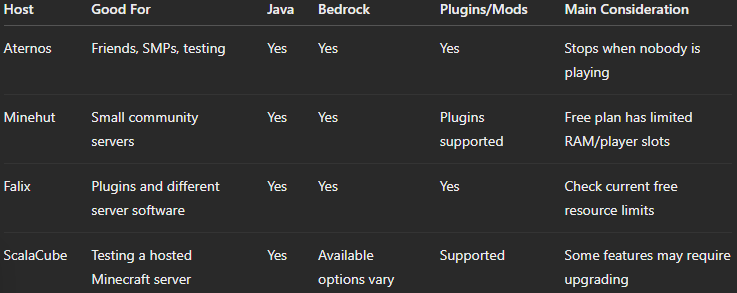
There is no single host that is perfect for every server. Your best choice depends on what you are trying to run.
What Should You Look for in Free Minecraft Hosting?
The biggest mistake when comparing hosts is looking only at RAM.
RAM matters, but Minecraft server performance depends on several things.
RAM
RAM stores the data your server is actively using.
A small Vanilla server with a few players requires far less memory than a heavily modded server.
Plugins, mods, generated chunks and player activity can all increase memory usage.
For very small servers, limited RAM may be manageable. Once your server becomes more complicated, additional memory becomes much more useful.
CPU Performance
Minecraft is highly dependent on CPU performance.
A server with lots of RAM can still lag if the processor cannot calculate ticks quickly enough.
Heavy farms, large numbers of mobs, rapidly generated chunks and complex plugins can all increase CPU load.
For this reason, simply choosing the free host advertising the highest RAM number does not automatically give you the fastest server.
Player Limits
Check whether the host limits simultaneous players.
A 10-player limit makes little difference if you are creating a private SMP for four friends.
It becomes a serious restriction if your goal is to build a public server.
Server Software
Your hosting provider should support the software you actually need.
Common options include:
Vanilla — standard Minecraft with no plugin system
Paper — performance-focused server software with plugin support
Spigot — widely used Bukkit-compatible plugin server
Purpur — Paper-based server with additional configuration options
Fabric — lightweight mod loader
Forge/NeoForge — commonly used for larger modded setups
For a public Minecraft server using plugins, Paper is often a sensible starting point.
File Access
Advanced server owners should check whether they receive:
File manager access
FTP/SFTP access
Custom
.jaruploadsCustom plugin uploads
World uploads and downloads
Database access
Backup downloads
Restricted file access is much less important for a basic SMP, but it becomes frustrating when you start developing a customised server.
Backups
You should always have a way to back up your world.
Minecraft worlds can represent hundreds of hours of building. Do not assume that "hosted online" automatically means your server has permanent backups.
Where possible, regularly download important world files or configure external backups.
How to Set Up a Free Minecraft Server
The exact control panel will depend on your host, but the basic process is usually very similar.
1. Choose Your Hosting Provider
Start by deciding what kind of server you want.
For example:
A basic survival world with friends
A Paper server using plugins
A modded Fabric server
A Forge or NeoForge modpack
A public SMP you want to grow over time
Choose a host that supports the required server software.
2. Create Your Server
Register an account and create a new Minecraft server.
You may be asked to select:
Java or Bedrock Edition
Minecraft version
Server software
Server name
Server address
Player limit
If you are unsure, start simple. You can always add features later.
3. Configure Basic Settings
Before inviting players, configure essentials such as:
Difficulty
Gamemode
PvP
Spawn protection
Whitelist
Maximum players
View distance
MOTD
If the server is only for friends, enabling a whitelist can prevent unknown players from joining.
4. Add Plugins or Mods
If you selected Paper, Spigot or Purpur, you can start installing compatible plugins.
Useful starter plugin categories include:
Permissions
Economy
Homes and teleportation
Anti-grief tools
Backups
Moderation
Server voting
Avoid installing dozens of plugins immediately. Add them gradually and check your server performance after each major change.
5. Join and Test the Server
Connect using the IP address or hostname provided by your host.
Before inviting everyone, test:
Joining and leaving
Player permissions
Commands
World generation
Plugin functionality
Server restart behaviour
Catching problems early is much easier than fixing them after players have started building.
Free Hosting vs Hosting Minecraft on Your Own PC
Another completely free option is self-hosting.
Instead of using a hosting provider, you can download the Minecraft server software and run it directly from your own computer.
The main advantage is control. You decide how much RAM the server receives, what files are installed and when it runs.
However, your computer must remain online whenever players want to connect.
You may also need to configure:
Java
Firewall rules
Port forwarding
Router settings
Dynamic DNS
Server security
Backups
Self-hosting also uses your own internet connection and hardware resources.
If you enjoy the technical side of running servers, it can be a useful learning experience. If you simply want to start playing with friends, free mc hosting from a third-party provider is usually easier.
When Should You Upgrade to Paid Minecraft Hosting?
A free server does not need to stay free forever.
In fact, free hosting can work well as a testing environment before spending money.
You should consider upgrading when your server starts experiencing:
Regular lag
Slow chunk generation
Memory limits
Player-slot restrictions
Long startup times
Restrictions on custom plugins
Limited file access
Insufficient storage
Players expecting permanent availability
A public server is especially dependent on reliability.
If a new player discovers your server but cannot connect because it is offline, you may lose that player before they ever see what your community offers.
Paid hosting also becomes more worthwhile once you start investing significant time into custom builds, plugins, development and promotion.
Growing a Minecraft Server After You Launch
Hosting the server is only the beginning.
If you want people outside your friend group to discover it, you need a way to promote the server and give existing players reasons to return.
One option is adding your server to a Minecraft server directory.
You can list your Minecraft server on MCVoting and create a listing that players can discover while browsing different Minecraft communities and gamemodes.
Server voting can also help turn your existing players into active promoters.
You can offer in-game rewards for voting and direct players to your voting page through:
/votecommandsNPCs
Server menus
Discord
Scoreboards
Chat reminders
Reward crates
If you are new to server voting, read our guide on how to vote on Minecraft servers.
You can also explore MCVoting.com to see how other server listings are structured.
FAQ
Is free Minecraft server hosting actually free?
Yes. Several hosting platforms provide servers that can be used without paying. However, free plans normally have restrictions such as shared resources, reduced RAM, sleeping when inactive or limited advanced functionality. Always check the current plan conditions before creating your server.
Can I host a Minecraft server for free 24/7?
It depends on the provider. Many free hosts shut servers down or place them into a sleeping state when nobody is connected. Permanently available hosting requires significantly more infrastructure, which is why always-online servers are more commonly found on paid plans.
How much RAM does a Minecraft server need?
There is no universal amount. A small Vanilla server with a few players needs considerably fewer resources than a heavily modded server or public network. Minecraft version, plugins, mods, world activity and player count all affect memory requirements.
Can you use plugins with free Minecraft hosting?
Yes, some free hosts support plugin-compatible server software such as Paper, Spigot or Purpur. Plugin availability and file-upload permissions vary between providers, so check what your chosen host allows before building your server.
Is free hosting good enough for a public Minecraft server?
It can be useful for testing a server concept or starting a very small community. If your server begins attracting regular players, paid hosting generally gives you more resources, control and predictable availability. You can start free and migrate once your requirements increase.
Conclusion
Free mc hosting is one of the easiest ways to experiment with running your own Minecraft server without committing to a monthly bill.
For a small SMP, plugin test server or private world with friends, services such as Aternos, Minehut, Falix and ScalaCube can provide enough functionality to get started. The important part is understanding the limits around RAM, CPU resources, uptime, player slots and file access.
Once your server begins growing, you can always migrate to more powerful hosting.
Explore Minecraft communities, discover new servers and cast your vote at MCVoting.com — the community-powered Minecraft server directory.
Ready to grow your server? List your Minecraft server on MCVoting for free and start receiving votes today.